HIPAA-ready · BAA included

HIPAA-ready patient forms, built, managed and installed by your AI agent.

Point Claude, ChatGPT or Cursor at hipaaform.ai and it builds the form and installs it on your website, or build one yourself in minutes. Every submission arrives encrypted — with the campaign that brought the patient in.

We reply within one business day. See how it works

  • BAA included
  • AES-256 encryption at rest
  • No PHI on your website
Already have the form on paper? Drop the PDF or Word file and get it back as a working online form, free. Convert a document

Works with your AI agent

  • Claude
  • ChatGPT
  • Gemini
  • Cursor
  • GitHub Copilot

and with your website

  • HTML5
  • Webflow
  • Squarespace
  • Wix
  • Shopify
  • WordPress
  • Elementor
Why it matters

The form already on your website probably isn’t safe for patient information

Ordinary form plugins and contact scripts were built for newsletter sign-ups, not health information. Here is what changes when the same form runs on hipaaform.ai.

A typical website formhipaaform.ai
Where answers are stored In your website’s database, readable by every plugin, theme and administrator Sealed with AES-256-GCM under a key unique to your organization
Notification emails Answers sent to an inbox in plain text A secure link by default — no patient data in the email
Business Associate Agreement Usually none Signed with every customer before any PHI is collected
Who saw what No record of who opened a submission Every view, export and change in an audit log you can read
Accessibility (ADA) Depends on your theme and plugin; pale text and mouse-only widgets are common Built and tested to WCAG 2.1 AA: contrast is enforced, and everything works from the keyboard
Marketing attribution Lost, or rebuilt by hand with hidden fields UTMs, ad click IDs and first-touch landing page on every submission

Replace your form We reply within one business day. BAA included.

Install anywhere

One form. Any website. Installed by you or your AI agent, live in minutes.

The same form works everywhere your practice has a web page. However it gets there, it runs in an isolated frame on our domain, so patient data never touches your site.

  1. Build

    Describe the form you need and the AI form builder builds it, or start from a healthcare template — intake, insurance verification, consent, screeners and more.

  2. Embed

    Ask your AI agent to install it, or paste two lines of HTML into any site builder or hand-coded page. WordPress has its own plugin, and a hosted link needs no website at all.

  3. Receive

    Submissions arrive encrypted in your panel with full attribution, ready to review, export or send on to your CRM, EHR or spreadsheet.

Ask your AI agent

Connect Claude, ChatGPT, Cursor or any AI agent that speaks MCP to your account. It builds and designs the form, publishes it, adds the right code to your site and checks the page.

Say it in your own words
“Create a new patient intake form
in our brand colours, put it on our
contact page and check it works.”
  • Sign in and approve — no keys to copy
  • Creates, designs and installs forms for you
  • Agents never have access to submissions

Paste it yourself

Paste two lines of HTML where the form should appear. That is the whole integration — no build step, no backend.

Your page’s HTML
<div data-hipaaform="k7m2xq9pd4tw"></div>
<script src="https://app.hipaaform.ai/embed.js" async></script>
  • Webflow, Squarespace, Wix, Shopify or hand-written HTML
  • React, Next.js, single-page apps and static sites
  • Or skip the embed and share the hosted link

WordPress

Install the plugin, then paste a shortcode or add the block. WordPress only ever stores the shortcode.

Any page or post
[hipaaform id="k7m2xq9pd4tw"]
  • Shortcode and Gutenberg block included
  • Works with Elementor, Divi, WPBakery and classic themes
  • No PHI in your WordPress database, plugins or email
  • Auto-resizing, mobile-friendly and fast
  • Conversion event for Google Tag Manager — without exposing answers

Request access We reply within one business day. BAA included.

Features

Simple enough for the front desk. Powerful enough for marketing.

A builder you already know how to use

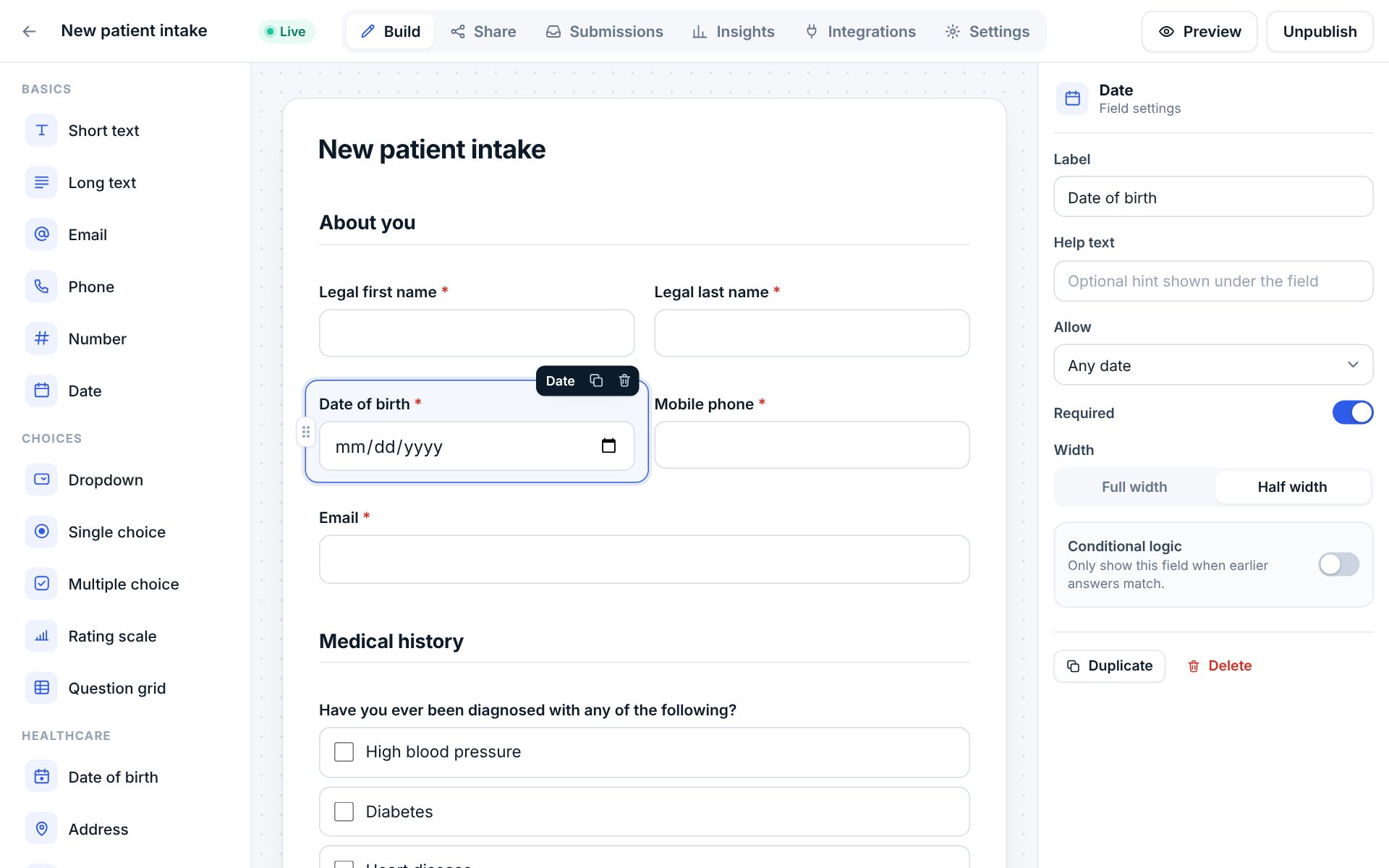
Click or drag fields onto a live preview. Multi-step pages, conditional logic, e-signatures, consent boxes and calculated scores — no training required.

The form builder: a field palette, a live preview of an appointment request form and field settings

Know which campaign worked

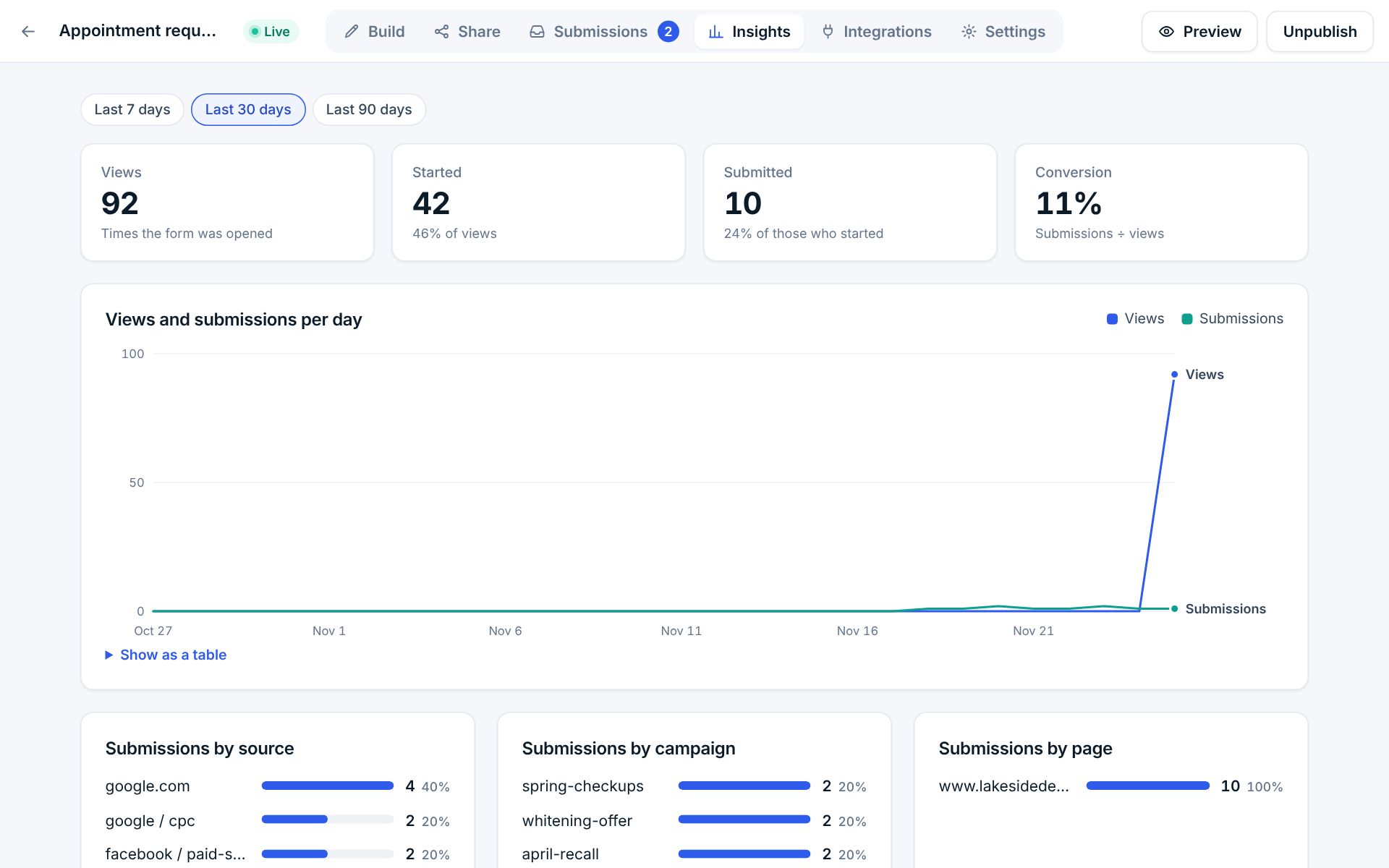
UTM parameters, ad click IDs, referrer and first-touch landing page are captured with every submission, and each form shows how many people viewed, started and submitted it.

Insights for one form: views, starts and submissions per day and submissions by source and campaign

A secure inbox for your team

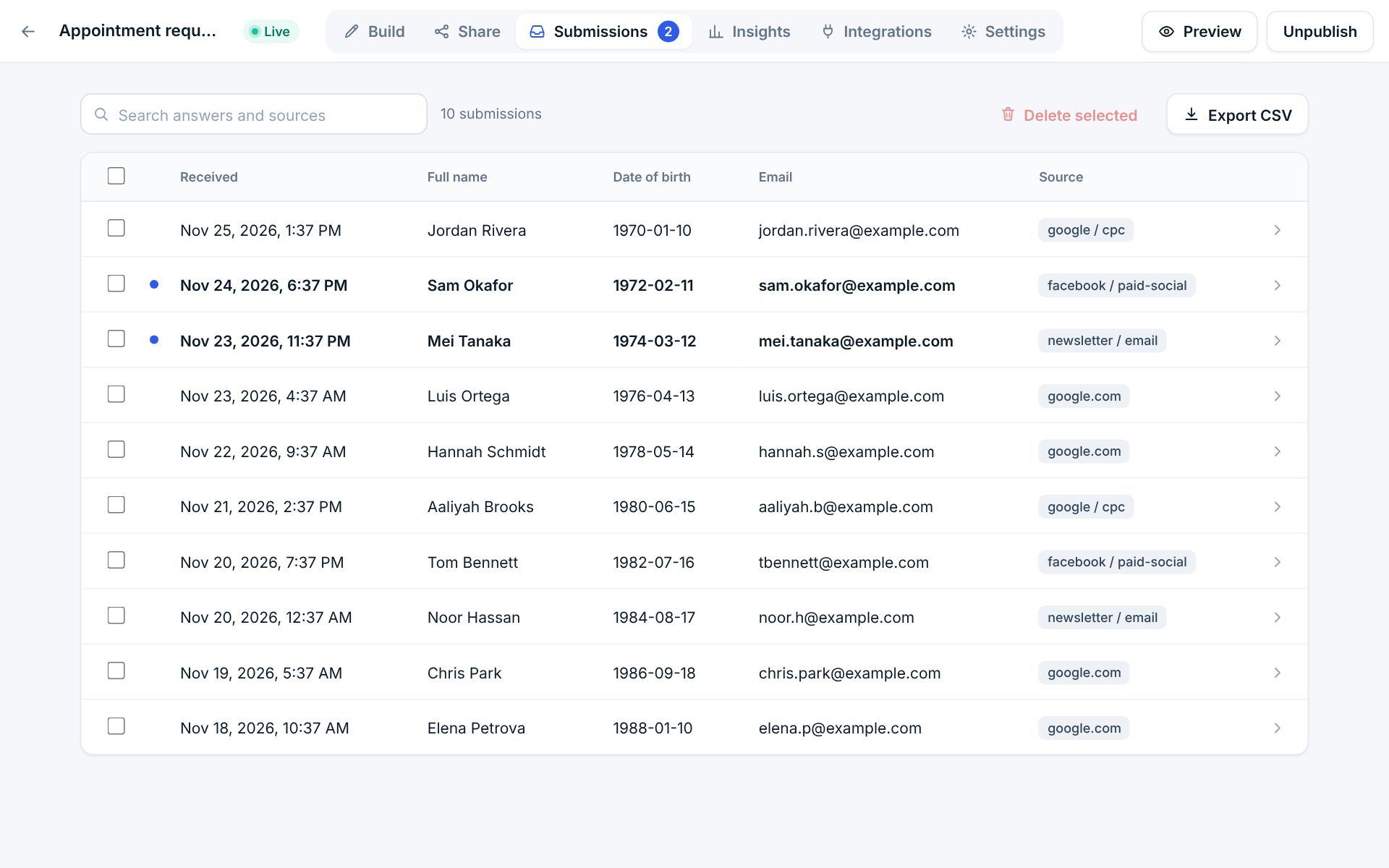
Read, search and print submissions in your panel or save one as a PDF. Each teammate has their own sign-in with two-factor authentication, and you see exactly who viewed what.

The submissions inbox: one row per submission with the answers and the campaign it came from
  • Describe it, and it’s built

    Tell the AI form builder what you need — “a short form to capture new patient leads that asks for insurance” — and it builds the form. Keep refining it in plain language, and match the colours of your own website.

  • Healthcare templates, ready to publish

    New patient intake, insurance verification, telehealth consent, release of information, refill requests, referrals, and PHQ-9 and GAD-7 screeners that score themselves.

  • ADA-ready for every patient

    Every form meets WCAG 2.1 AA, the standard used for the ADA and Section 508. Colour contrast is enforced whatever theme you choose, everything works from the keyboard and with screen readers, and signatures can be typed.

  • Collect the copay with the form

    Add a payment to any form: a set copay or deposit, or a balance the patient enters. It is paid by card on Stripe’s secure page, straight into your own Stripe account, and Stripe never sees an answer.

  • On a tablet at your front desk

    The hipaaform Kiosk app turns an iPad, Android tablet or phone into a check-in station. Patients fill in the same forms in your practice, nothing is stored on the device, and answers land in the same inbox. Learn more

  • A QR code for the waiting room

    Print a sheet with a QR code that opens any form on the patient’s own phone. Lay it out with your logo and wording, preview it and print; scans show up in your inbox as their own source.

  • Easy for patients to finish

    Split long forms into steps, let people save and finish later, collect insurance cards as file uploads, and show the form in English, Spanish, French, German or Portuguese.

  • Alerts without the risk

    Get an email with a secure link the moment a form arrives, or an alert in Slack, Microsoft Teams or Google Chat. Chat alerts never carry patient data.

  • Connected and exportable

    Write submissions straight into Google Sheets, HubSpot, Salesforce or a FHIR-capable EHR, use signed webhooks and the REST API, or export any form to CSV in one click. Every export is recorded.

One tool for the practice, the marketer and the agency

  • Practices and clinics

    Put intake, appointment and contact forms online without an IT project. Your front desk reads submissions in a secure inbox, with a separate sign-in for each teammate.

  • Clinic marketers

    See which campaign, ad and landing page produced each inquiry, and send a conversion event to Google Tag Manager that never contains the patient’s answers.

  • Agencies and developers

    Keep PHI off the sites you build and maintain. Two lines of HTML on any stack, a plugin for WordPress, an MCP server your coding agent can use to install forms for you, and a REST API and signed webhooks when a client needs more.

Integrations

Send every submission where your team already works

Anything that carries answers needs an account owner to confirm the destination first, so patient data never leaves by accident.

Alerts

No patient data, ever

  • Email with a secure link
  • Slack
  • Microsoft Teams
  • Google Chat

Connectors

No code, retried on failure

  • Google Sheets
  • HubSpot
  • Salesforce
  • EHR (FHIR R4)

For developers

Signed, logged and documented

  • MCP server for AI agents
  • Signed webhooks
  • REST API
  • Zapier, Make and n8n

Request access We reply within one business day. BAA included.

Pricing

Every feature on every plan. Pay only for volume.

Pro Plus

For busier practices

$129 / month

Billed monthly.

Request access
5,000 submissions a month

Pro Unlimited

For the highest volume

Custom pricing

Based on your monthly volume

Talk to us
Unlimited submissions

Included in every plan

  • Unlimited forms
  • Unlimited team members
  • BAA signed online, before any PHI
  • Your AI agent builds and installs forms (MCP)
  • Single sign-on, API and webhooks
Security

Built around the HIPAA Security Rule

Compliance is a shared responsibility. Here is our side of it.

Encryption everywhere

TLS in transit. Every submission is sealed with AES-256-GCM using a key unique to your organization before it is written to disk.

Access controls

Individual sign-ins with mandatory two-factor authentication, optional single sign-on, lockout after repeated failures and automatic sign-out when a session goes idle.

Audit controls

Sign-ins, submission views, exports, deletions and configuration changes are recorded with who, when and from where.

Minimum necessary

Notification emails carry a secure link, not patient data. AI agents can build and install forms but never read submissions. Our own staff see counts, not contents, unless you ask for support.

Isolated by design

Forms run in a sandboxed frame on our domain, away from themes, plugins and third-party scripts on your site. Spam is stopped without third-party CAPTCHAs.

Business Associate Agreement

We sign a BAA with every customer before any protected health information is collected.

FAQ

Questions, answered plainly

What is hipaaform.ai?

hipaaform.ai is a HIPAA-ready form builder for healthcare websites. You build a form in a drag-and-drop editor, add it to any website — yourself or by asking your AI agent — and receive each submission encrypted in a secure inbox — together with the marketing campaign that brought the patient in.

Is hipaaform.ai HIPAA compliant?

HIPAA compliance is a shared responsibility between a vendor and each practice. hipaaform.ai provides the technical safeguards the HIPAA Security Rule expects of a form vendor — encryption in transit and at rest, individual sign-ins, automatic sign-out, account lockout and audit logs — and signs a Business Associate Agreement (BAA) with every customer before any protected health information is collected. There is no official “HIPAA certification”; your organization stays responsible for its own policies and for how it uses the data.

Do you sign a Business Associate Agreement (BAA)?

Yes. We sign a BAA with every customer before a single answer is collected. It is part of onboarding, not an add-on.

Can my AI agent create and install forms for me?

Yes. hipaaform.ai has an MCP server, so you can connect Claude, ChatGPT, Gemini, Cursor, GitHub Copilot or any AI agent that supports connectors to your account by signing in. Ask it for the form you need and it builds it from a healthcare template or from scratch, sets its design, publishes it when you approve, adds the right code to your website and checks the page. Agents work with form definitions and embed code only: there is no way for an agent to read, export or delete submissions, or to decide where submissions are sent.

Can patients fill in forms on a tablet in my practice?

Yes. The hipaaform Kiosk app for iPad, iPhone and Android turns a tablet or phone into a place where patients fill in your published forms at the front desk. You pair it with your account by scanning a QR code, choose which forms it may show, and staff can pick exactly the forms the next patient needs. Nothing a patient types is stored on the device, the device can send submissions but never read them, and each submission arrives in the same inbox labelled with the device’s name.

Are the forms ADA compliant?

Every form is built and tested to WCAG 2.1 level AA, the standard used for the ADA and Section 508. Colour contrast is enforced automatically: if a theme asks for text that would be hard to read, the form draws the nearest shade that passes. Every field has a proper label, errors are described in words and announced to screen readers, the whole form works from the keyboard, signatures can be typed instead of drawn, and forms reflow on small screens and at 200% zoom. Each release is checked in a real browser with axe-core against every template and field type. Like HIPAA, accessibility is shared: the wording of your questions, any custom CSS you add and the page around the form remain yours.

Can a form take a payment?

Yes. Connect your own Stripe account once, then add a payment field to any form: a set amount such as a copay or deposit, or an amount the patient enters to pay a balance. The patient’s answers are saved first, then they pay by card on a page hosted by Stripe, and the money goes directly to your Stripe account. Card details never touch hipaaform.ai or your website. Stripe is told the amount and your practice’s name and never any question or answer, because Stripe does not sign a Business Associate Agreement. A submission that was not paid is kept and marked as not paid.

How is this different from a regular website form or form plugin?

Ordinary contact forms and form plugins store submissions in the website’s own database and email them in plain text, which exposes patient data to every plugin, theme and administrator on the site. With hipaaform.ai the form runs in an isolated frame served from our domain, so answers go straight to encrypted storage and never touch WordPress. Your site only holds a shortcode.

Which websites does it work with?

Any of them. Paste two lines of HTML into any website or site builder — Webflow, Squarespace, Wix, Shopify, a React or Next.js app, or hand-written HTML. WordPress has its own plugin with a shortcode and a block, and you can also share the hosted link to the form directly.

How are submissions protected?

Submissions travel over TLS and are sealed with AES-256-GCM before they are written to disk, using an encryption key that is unique to your organization. Answers, attribution data and the IP address are all encrypted. Every sign-in, submission view, export, deletion and configuration change is recorded in an audit log you can read.

Can I see which ad or campaign a submission came from?

Yes. UTM parameters, Google, Meta, Microsoft, TikTok and LinkedIn click IDs, the referrer, the page the form was on and the first-touch landing page are captured automatically with every submission. A conversion event is also sent to the page and to Google Tag Manager’s dataLayer, and it never contains the patient’s answers.

Do notification emails contain patient data?

Not by default. Notification emails say that a new submission arrived and carry a secure link to view it after signing in. Including answers in the email is an explicit opt-in per form.

What kinds of fields and forms can I build?

Templates are included for new patient intake, appointment requests, insurance verification, telehealth consent, release of information, prescription refills, referrals, satisfaction surveys and the PHQ-9 and GAD-7 screeners, or you can start from a blank form. Available fields: short text, long text, email, phone, number, date, date of birth, address, insurance details, dropdown, single choice, multiple choice, rating scale, question grid, file upload, consent checkbox, e-signature, calculated score, section heading, text block, page break and hidden field. Forms can be split into steps, fields can be shown or hidden with conditional logic, and people can save a long form and finish it later.

Can AI build the form for me?

Yes. Describe the form you need in plain language — for example “a patient form to capture leads that asks for insurance” — and the AI form builder builds it as a draft. You can keep asking for changes in the builder (“add a preferred contact time”, “split it into two pages”, “translate it to Spanish”), undo any of them, and give your website address so the form matches your brand colour. The assistant only builds and edits forms and declines anything else. It is sent the form’s structure and your instruction — never submissions — and you should not type patient information into it. It runs on Claude, a model made by Anthropic.

Can I export submissions or send them to other systems?

Yes. Any form can be exported to CSV with answers and attribution side by side, any submission can be saved as a PDF, and each form can post new submissions to your own HTTPS endpoint with an HMAC-SHA256 signed webhook that is retried if your endpoint is down. Connectors write submissions straight into Google Sheets, HubSpot, Salesforce or a FHIR-capable EHR, and a REST API covers everything else. Every export and API read is recorded in the audit log.

How do I get started?

Request access on the website. We set up your workspace, send your BAA and help you publish your first form. We usually reply within one business day.
Get started

Patient forms your website can actually be trusted with

Request access and we’ll set up your workspace, send your BAA and help you publish your first form — on WordPress or any website.

  1. We reply by email

    Usually within one business day.

  2. You sign the BAA

    Included with every account, before any PHI is collected.

  3. Your first form goes live

    On any website, with our help if you want it.

Where will the form live? Optional

We reply within one business day. BAA included with every account.